Recently, I’ve faced the following problem: a customer has created a links list, and she extended it with some additional fields. One of the fields was a choice field, called “Target”, where user could choose between standard target options for the link opening (“_self”, “_blank”, “_parent”…) .
The challenge there was that the link, from the links list (the field was renamed from “URL” to “Destination”), should be opened in the target window specified in the field “Target”.
The only way was to make some XSLT transformation in the standard SharePoint 2010 Data View web part.
Here is it, step by step:
1. Create a page (or use existing), and put the list as a web part into the page. Pay attention on the fields “Destination” (contains URL) and “Target” (contains target):

2. Open the page in the SharePoint designer:


3. Click on the “URL” field (named “Destination” in our case), and chose “Hyperlink options” from the popup menu.
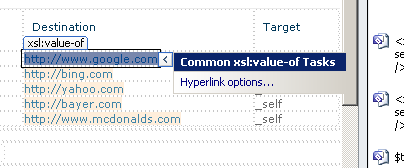
4. Don’t change any options, just click on “OK”. XSLT transformation for the field will be created.

5. There is a bug in SharePoint Designer, which, after creating XSLT transformation, puts both of the URL field’s attributes (“Url”, “Description”) into the web part surface, so we need to remove one of the attributes from the XSLT – in our case “Description” (switch to the Code View in SharePoint Designer):

(bug produced by SharePoint Designer)

(removing the “description” attribute from the the Data View web part in the XSL).
6. Now, we need to create a new variable which will hold the value of the “Target” field – create it where the other variables inside the XSLT block are created:

7. Go back to the link from the step 5, and insert the “target” attribute inside the <a> tag, which will point to our new variable:

And that should be it. The links are now being opened in the specified target  .
.